
Description
Unlike other auto-sorting backpack mods, this mod adopts a “player manual
classification” design philosophy, giving players full control over item sorting.
Key Features:
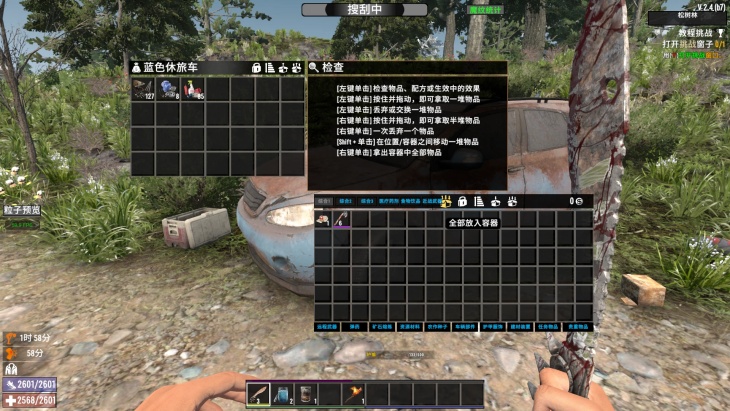
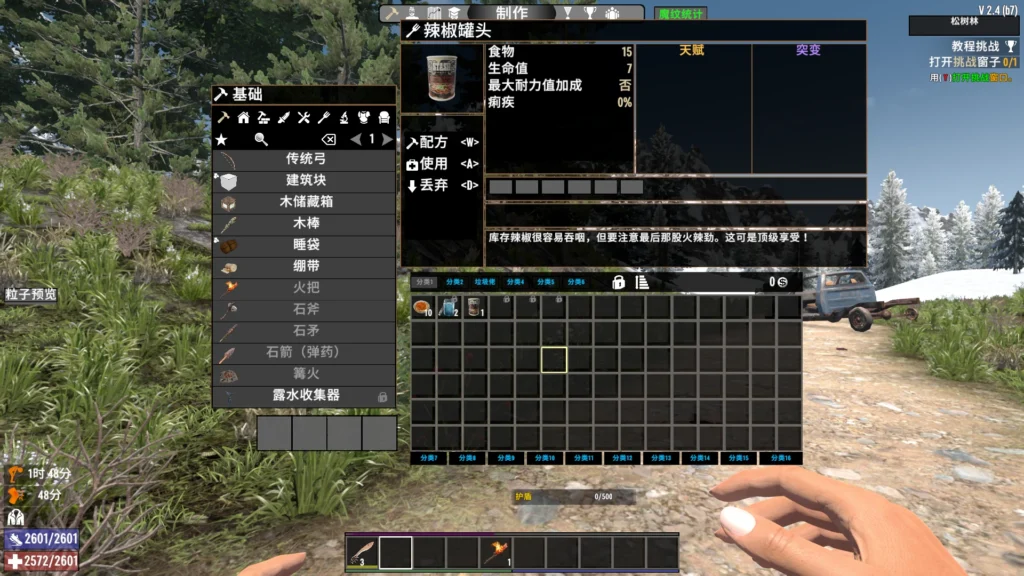
• 16-page categorized backpack, 90 slots per page, 1440 slots total
• Fully player-defined item classification, no auto-sorting interference
• Support for category tab renaming
• Support for slot locking
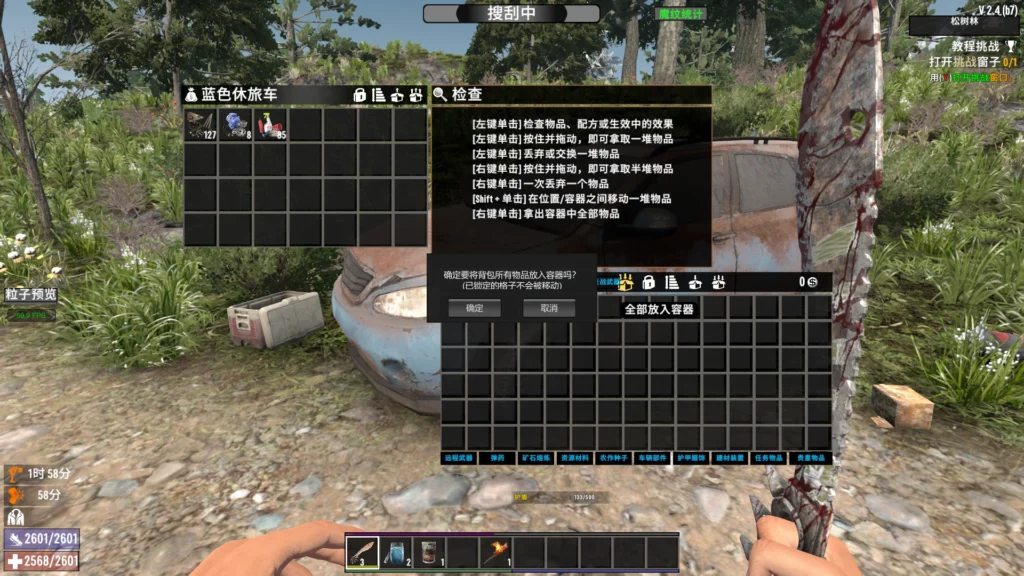
• One-click “Stash All” to container feature
[FEATURE DETAILS]
================================================================================
1. 16 Category Tabs
——————————————————————————–
There are 16 category tab buttons at the top of the backpack. Click to switch.
Default Tab Names:
Page 1: General1 Page 9: Ores/Smelting
Page 2: General2 Page 10: Resources
Page 3: General3 Page 11: Plants/Farming
Page 4: Medical Page 12: Vehicles/Fuel
Page 5: Food/Drinks Page 13: Armor/Clothing
Page 6: Melee Page 14: Building/Mods
Page 7: Ranged Page 15: Quest Items
Page 8: Ammo Page 16: Miscellaneous
Tip: Tab names can be customized (see below).
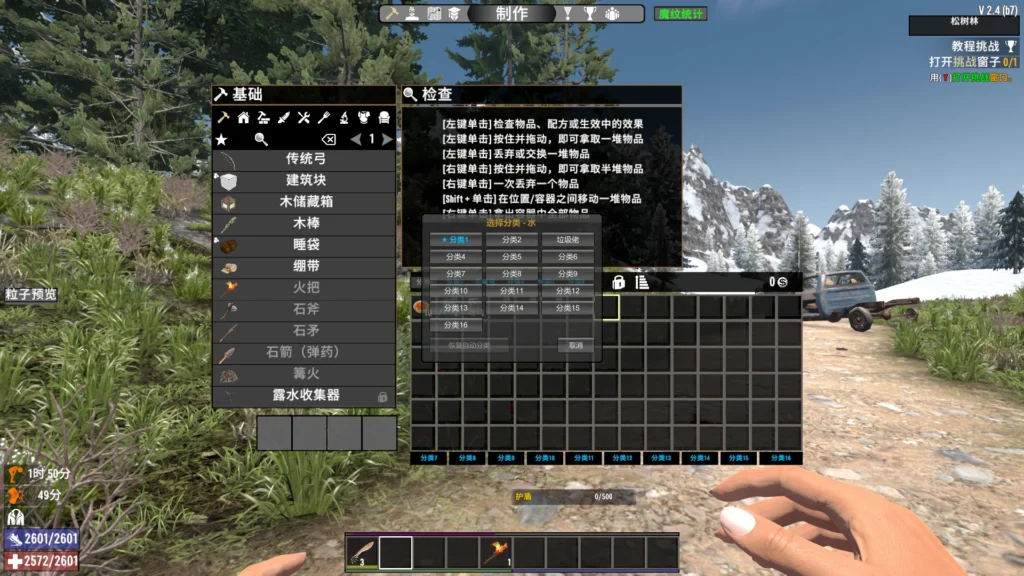
2. Custom Item Classification (CTRL + Right-Click)
——————————————————————————–
This is the core feature of this mod!
How to Use:
1. Hover your mouse over any item in your backpack
2. Hold CTRL and Right-Click
3. A category selection window will appear showing all 16 categories
4. Click the category button you want to assign the item to
5. This item type will now be recognized as this category
Selection Window Info:
• Current category is marked with ★ and highlighted in blue
• Click “Restore Auto-Sort” to cancel custom setting and restore default
• Press ESC or click outside the window to close
Important Notes:
• Custom classification applies to item TYPES, not individual items
• Example: Setting “Purified Water” to “Food/Drinks” affects ALL purified water
• Custom settings are saved in UserCategoryConfig.xml
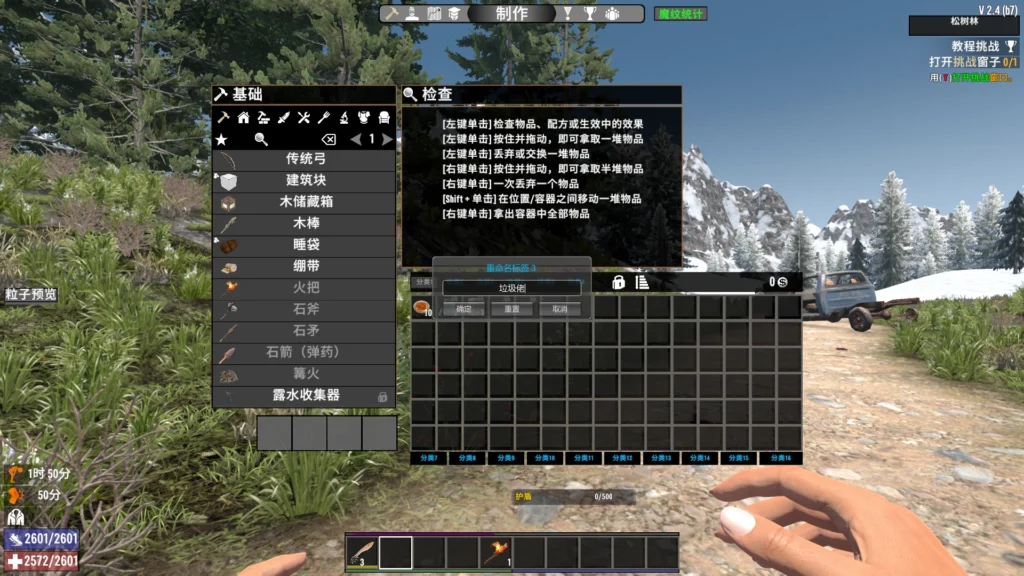
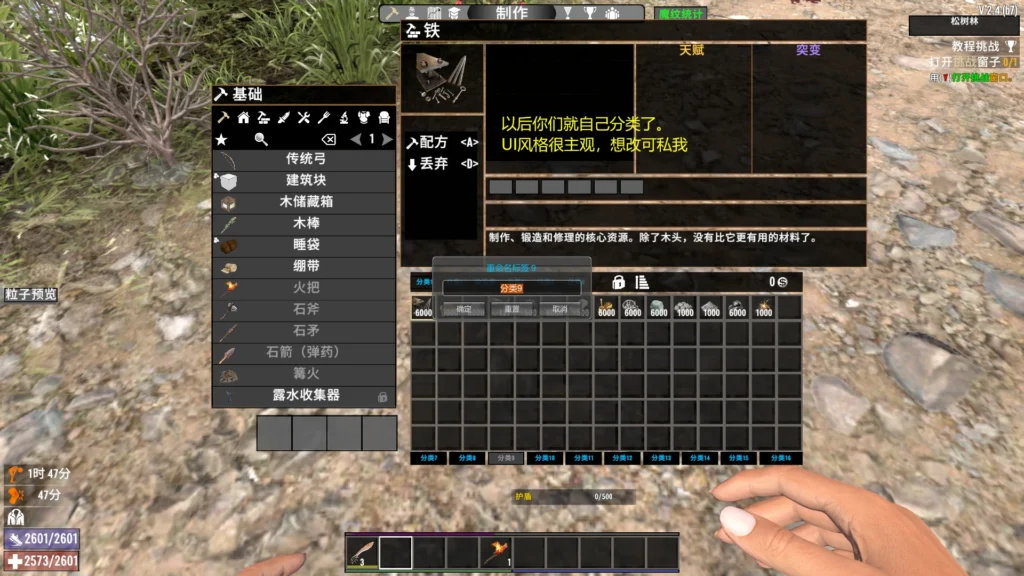
3. Tab Renaming (Right-Click on Tab)
——————————————————————————–
You can give each category tab a custom name.
How to Use:
1. Hover your mouse over a tab button at the top
2. Right-Click
3. A rename input box will appear
4. Enter the new tab name (2-4 characters recommended)
5. Press Enter or click “OK” to save
Tips:
• Tab names are saved in TabNameConfig.xml
• Names persist after game restart
4. Slot Locking Feature
——————————————————————————–
Locked slots will not be affected by “Stash All” and other batch operations.
How to Use:
• Use the game’s built-in slot locking feature
• Lock status is saved per page
Important Notes:
• Each page has independent lock status
• Lock info is saved in PagedLockConfig.xml
5. Stash All to Container
——————————————————————————–
When opening a chest/container, you can transfer all backpack items at once.
Instructions:
• Clicking “Stash All” button will show a confirmation dialog
• Items in locked slots will NOT be moved
• Click “Confirm” to execute, click “Cancel” or press ESC to cancel
[CONFIGURATION FILES]
================================================================================
The mod folder contains the following configuration files:
1. UserCategoryConfig.xml – User Custom Categories
Stores item classifications set by CTRL+Right-Click.
Example format:
<userCategories>
<item name=”drinkJarBoiledWater” page=”5″ />
<item name=”foodBaconAndEggs” page=”5″ />
</userCategories>
2. TabNameConfig.xml – Custom Tab Names
Stores renamed tabs.
Example format:
<TabNames>
<Tab index=”2″ name=”Junk” />
<Tab index=”5″ name=”Food” />
</TabNames>
3. PagedLockConfig.xml – Page Lock Status
Stores locked slot positions for each page.
Example format:
<PagedLocks>
<Page index=”4″ slots=”1,2,3,4″ />
<Page index=”6″ slots=”1″ />
</PagedLocks>
[INSTALLATION]
================================================================================
1. Ensure game version compatibility (V2.4 or higher recommended)
2. Place the entire ZZZ_SortedBackpackV0.6_Custom folder into:
<Game Directory>/Mods/
3. Folder name starts with ZZZ_ to ensure it loads after other mods
4. Launch the game to activate
[IMPORTANT NOTES]
================================================================================
1. Compatibility
• This mod modifies backpack UI, may conflict with other backpack mods
• Not recommended to use with other sorting backpack mods
2. Save Safety
• This mod does not modify save data, uninstalling won’t affect saves
• However, custom classification settings will be lost (stored in config files)
3. Server Usage
• This mod only affects client UI, server does not need to install
• But if server has it installed, clients also need to install
4. Backup Recommendations
• Regularly backup config files (UserCategoryConfig.xml etc.)
• Backup entire mod folder before updating
5. Items Don’t Auto-Move
• This mod only affects “which page new items go to” logic
• Existing items will NOT auto-move to corresponding category pages
• Manual organization or sorting is required
[HOTKEY SUMMARY]
================================================================================
CTRL + Right-Click On item, open category selection window
Right-Click On tab button, open rename window
ESC Close popup windows
Left-Click On tab button, switch pages
[FAQ]
================================================================================
Q: Why aren’t items auto-sorting to their category pages?
A: This mod uses manual classification design. You need to use CTRL+Right-Click
to assign categories to items first, then that item type will auto-sort
to the corresponding page when picked up.
Q: How to restore default tab names?
A: Delete TabNameConfig.xml file and restart the game.
Q: How to clear all custom classifications?
A: Delete UserCategoryConfig.xml file and restart the game.
Q: What if slot lock status is lost?
A: Check if PagedLockConfig.xml file exists. If deleted, lock status needs
to be set again.
Q: Will config be lost after mod update?
A: As long as config files (xml files) are preserved, config will be
automatically loaded after mod update.
[CHANGELOG]
================================================================================
================================================================================
Thank you for using! Enjoy the game!
================================================================================
================================================================================
自定义分类背包 (SortedBackpackCustom) 使用说明
版本 1.0.0 | 作者:真好玩
================================================================================
【模组简介】
——————————————————————————–
自定义分类背包是一个为七日杀设计的背包扩展模组。与其他自动分类背包不同,本模组
采用”玩家手动分类”的设计理念,让玩家完全掌控物品的分类方式。
核心特点:
• 16页分类背包,每页90个格子,共1440个格子
• 完全由玩家自定义物品分类,无自动分类干扰
• 支持分类标签重命名
• 支持格子锁定功能
• 支持一键存储到容器功能
【功能详解】
================================================================================
一、16页分类标签
——————————————————————————–
背包顶部有16个分类标签按钮,点击即可切换到对应页面。
默认标签名称:
第1页: 综合1 第9页: 矿石熔炼
第2页: 综合2 第10页: 资源材料
第3页: 综合3 第11页: 植物农作
第4页: 医疗药剂 第12页: 载具燃料
第5页: 食物饮品 第13页: 护甲服饰
第6页: 近战武器 第14页: 建材装置
第7页: 远程武器 第15页: 任务物品
第8页: 弹药消耗 第16页: 杂项其它
提示:标签名称可以自定义修改(见下文)。
二、自定义物品分类 (CTRL+右键)
——————————————————————————–
这是本模组的核心功能!
操作方法:
1. 将鼠标悬停在背包中的任意物品上
2. 按住 CTRL 键,同时点击 鼠标右键
3. 弹出分类选择窗口,显示全部16个分类
4. 点击想要归类到的分类按钮
5. 该物品以后都会被识别为这个分类
选择窗口说明:
• 当前物品所属的分类会用 ★ 标记并以蓝色高亮显示
• 点击 “恢复自动分类” 可取消自定义,恢复为默认分类
• 按 ESC 或点击窗口外部可关闭选择窗口
重要提示:
• 自定义分类是针对物品类型的,不是针对单个物品
• 例如:将”纯净水”设为”食物饮品”后,所有纯净水都会归入该分类
• 自定义设置保存在 UserCategoryConfig.xml 文件中
三、标签重命名 (右键点击标签)
——————————————————————————–
你可以给每个分类标签起一个自己喜欢的名字。
操作方法:
1. 将鼠标悬停在顶部的标签按钮上
2. 点击 鼠标右键
3. 弹出重命名输入框
4. 输入新的标签名称(建议2-4个字符)
5. 按 Enter 或点击”确定”保存
提示:
• 标签名称保存在 TabNameConfig.xml 文件中
• 重启游戏后名称依然保留
四、格子锁定功能
——————————————————————————–
锁定的格子不会被”全部放入容器”等批量操作影响。
操作方法:
• 使用游戏原版的格子锁定功能即可
• 锁定状态会按分页保存
重要提示:
• 每个分页有独立的锁定状态
• 锁定信息保存在 PagedLockConfig.xml 文件中
五、全部放入容器
——————————————————————————–
打开箱子/容器时,可以一键将背包物品放入容器。
操作说明:
• 点击”全部放入”按钮后会弹出确认对话框
• 已锁定的格子中的物品不会被移动
• 点击”确定”执行操作,点击”取消”或按ESC取消
【配置文件说明】
================================================================================
模组目录下有以下配置文件:
1. UserCategoryConfig.xml – 用户自定义分类
存储玩家通过 CTRL+右键 设置的物品分类。
格式示例:
<userCategories>
<item name=”drinkJarBoiledWater” page=”5″ />
<item name=”foodBaconAndEggs” page=”5″ />
</userCategories>
2. TabNameConfig.xml – 自定义标签名称
存储玩家重命名的标签。
格式示例:
<TabNames>
<Tab index=”2″ name=”垃圾佬” />
<Tab index=”5″ name=”吃喝” />
</TabNames>
3. PagedLockConfig.xml – 分页锁定状态
存储每个分页中被锁定的格子位置。
格式示例:
<PagedLocks>
<Page index=”4″ slots=”1,2,3,4″ />
<Page index=”6″ slots=”1″ />
</PagedLocks>
【安装说明】
================================================================================
1. 确保游戏版本兼容(建议 V2.4 或更高版本)
2. 将整个 ZZZ_SortedBackpackV0.6_Custom 文件夹放入:
<游戏目录>/Mods/
3. 文件夹名称以 ZZZ_ 开头是为了确保在其他模组之后加载
4. 启动游戏即可生效
【注意事项】
================================================================================
1. 兼容性
• 本模组会修改背包UI,可能与其他修改背包的模组冲突
• 建议不要与其他分类背包模组同时使用
2. 存档安全
• 本模组不修改存档数据,卸载后不会影响存档
• 但自定义分类设置会丢失(存在配置文件中)
3. 服务器使用
• 本模组仅影响客户端UI,服务器无需安装
• 但如果服务器安装了,客户端也需要安装
4. 备份建议
• 建议定期备份配置文件(UserCategoryConfig.xml 等)
• 更新模组前建议备份整个模组文件夹
5. 物品不会自动移动
• 本模组只影响”新拾取物品放入哪一页”的逻辑
• 已有物品不会自动移动到对应分类页
• 需要手动整理或使用排序功能
【快捷键汇总】
================================================================================
CTRL + 右键 对准物品,打开分类选择窗口
右键 对准标签按钮,打开重命名窗口
ESC 关闭弹出窗口
左键 点击标签按钮,切换分页
【常见问题】
================================================================================
Q: 为什么物品没有自动分类到对应页面?
A: 本模组采用手动分类设计。需要使用 CTRL+右键 为物品指定分类后,
该类型的物品才会在拾取时自动放入对应页面。
Q: 如何恢复默认的标签名称?
A: 删除 TabNameConfig.xml 文件,重启游戏即可恢复默认。
Q: 如何清除所有自定义分类?
A: 删除 UserCategoryConfig.xml 文件,重启游戏即可。
Q: 格子锁定状态丢失了怎么办?
A: 检查 PagedLockConfig.xml 文件是否存在。如果被删除,锁定状态
需要重新设置。
Q: 模组更新后配置会丢失吗?
A: 只要保留配置文件(xml文件),更新模组后配置会自动读取。
【更新日志】
================================================================================
V0.8 (2025-12-14)
• 新增自定义分类功能(CTRL+右键)
• 新增3列网格布局的分类选择界面
• 新增”恢复自动分类”功能
• 优化窗口交互(ESC关闭、点击外部关闭)
V0.6 (之前版本)
• 基础16页分类背包功能
• 物品自动分类
• 分类标签按钮
================================================================================
感谢使用!祝游戏愉快!
================================================================================
Images
Download
DOWNLOAD ✔ Verified Safe (31 KB)
This file was scanned for viruses and verified safe using Norton 360.
Credits: It_ssofun



If you have any questions or have any problems/bugs, please use the support link (Discord, Forum Topic, GitHub Issues, etc.) in the post. If there is no support link in the post, please use the comments section.