
Description
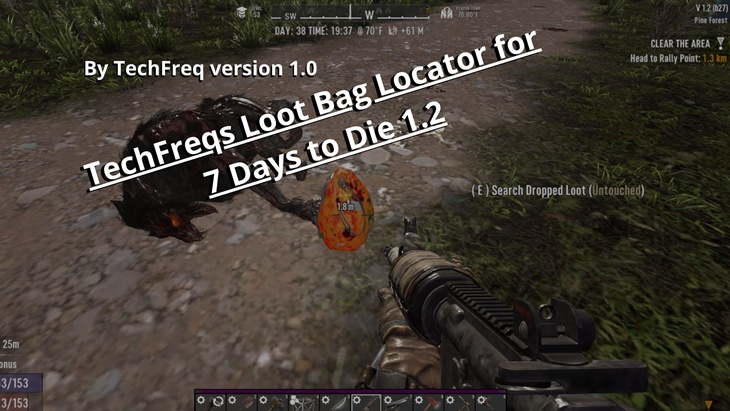
The TechFreqs Loot Bag Locator Mod V3.1, enhances the gameplay experience in 7 Days to Die by allowing players to dynamically toggle the visibility of loot bag markers (icons and distance text) in the game world. It provides a convenient way to locate dropped loot bags from zombies, animals, or other sources without cluttering the screen when not needed.
Tired of missing out on valuable loot because it’s too hard to spot? The Loot Bag Locator mod has you covered!
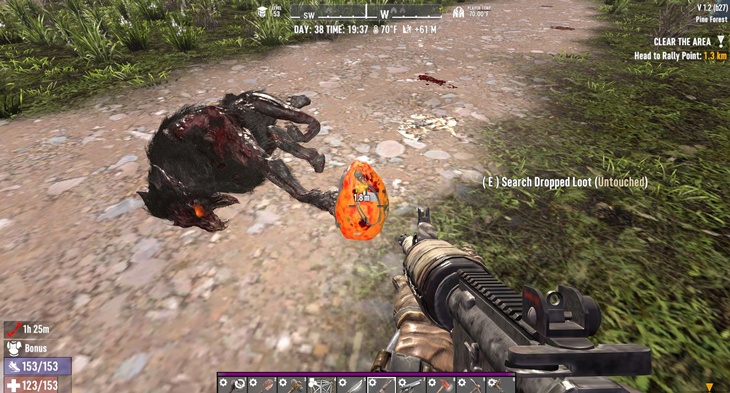
This mod adds a visible fetch loot icon and distance tracker to vanilla loot containers, ensuring you never miss a loot bag again.
Whether it’s a dropped loot container, a vehicle container, or loot dropped by powerful entities, the bright yellow fetch icon and distance display will guide you straight to the treasure. No more wandering around aimlessly around when—your loot is now just a glance away!
Key Features:
When toggling the locator on or off a brief tooltip appears to confirm the current state (e.g., “Loot bag locator ON/OFF”).
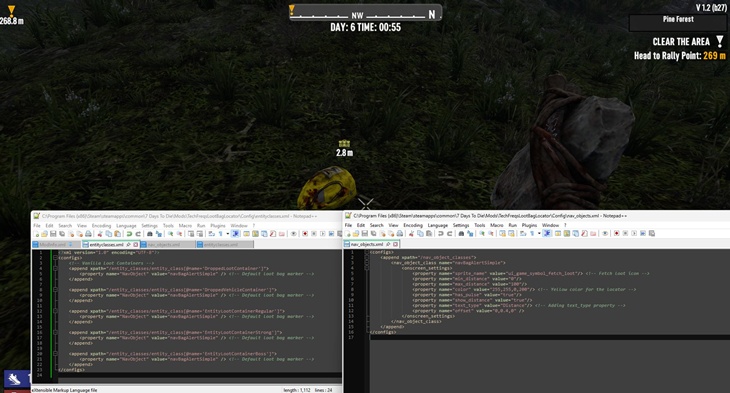
Custom fetch loot icon (ui_game_symbol_fetch_loot) for easy identification, from the nav objects xml using an existing icon predetermined for the fetch loot bags.
Distance display to show how far you are from the loot container.
Visual indicators for various loot containers, including regular, strong, and boss loot.
A Simple and user-friendly mod integration with existing game mechanics.
Players can press a configurable key (default: NumPad 1) to toggle the visibility of loot bag markers on or off The toggle key can be customized via a config.json file, allowing players to use their preferred key.
When toggled off, the loot bag icons and distance text are hidden, reducing screen clutter.
When toggled on, the markers reappear, making it easier to locate loot bags.
Dynamic Handling Debugging and Logging:
The mod dynamically manipulates the NavObject properties (IsActive, hiddenOnCompass, hiddenOnMap) for all loot containers at runtime.
This ensures compatibility with all types of loot containers (e.g., EntityLootContainerRegular, EntityLootContainerBoss, etc.).
AS you may know logs may be cluttered, but in this version it isn’t spammed for the same lootbags.
The mod logs detailed information to the console, such as the number of loot containers processed and their NavObject states.
This makes it easy to troubleshoot and verify the mod’s behavior.
How It Works:
The mod uses Harmony patches to intercept and modify the behavior of loot containers and the player’s input.
When the toggle key is pressed, the mod iterates through all loot containers in the game world and updates their NavObject properties to show or hide the markers.
The config.json file allows players to customize the toggle key and other settings.
Benefits:
Improved Gameplay: Players can easily locate loot bags without permanently cluttering their screen.
Customizable: The toggle key can be changed to suit individual preferences.
Lightweight: The mod dynamically handles loot containers without requiring extensive XML edits or additional assets.
Compatibility:
Works in both single-player and multiplayer.
Server & client-side configurations
Should not conflict with other mods unless theirs other modified compass related lootbag mods installed.
Disclaimer:
By using this mod, you acknowledge that TechFreq is not responsible for any issues, crashes, or conflicts caused by its use.
Use at your own risk. Please backup your game files before installing any type of mod.
Thanks for downloading and enjoy!
Installation:
Make sure harmony mod exist in the mod directory as it’s required.
Download the mod files, Extract Mod files.
Please backup your world, save, and or game files.
Place them in your Mods directory of your 7 Days to Die Game.
EAC must be disabled, although i hope in the future that can be changed, as for now DLLS are not EAC supported however XML has no issue, unfortunately this is a dll modification.
THIS IS CLIENT SIDE ONLY but maybe perhaps this is also, server side and client side compatibility?
No further setup needed. Enjoy!
CREDITS:
Thanks to TechFreq & A.I, ChatGPT or Microsoft CoPilot A.I or Grok AI from Twitter or X, for helping me create the modlet, aswell as with very little modding knowledge for the game and learning as i go i couldn’t do this without it and overall brainstorming and or the modding community.
I’d very much appreciate it and or any feedback for the mod(s) aswell
Support Notice: The best way to support TechFreq other than downloading mods, sharing the mod with friends, leaving feedback and endorsing the mod in general is all that i ask for, but if you want to go the extra mile although not necessary you may use Donation Links through paypal or ko-fi pages which again helps me a bunch!
However, Donations aren’t expected, every little bit of support helps along the way & fuels more mods, music, and bug fixes in the future,so thanks again for reading and being awesome in general and checking out the mod post.
Social Media:
If you appreciate ‘TechFreqs’ work and want to show support, use this donation link, although not necessary. Kofi Page.
I appreciate it in general for just checking out the mod posts, sharing and enjoying any of the mods in itself. Thank you again! and Happy gaming!
Love this mod? Got feedback or ideas or need to troubleshoot?
Join the TechFreq Pretty Rad Squad Discord Server!
Chill with us on Discord for game chat, memes, and even more mod updates!
As for TechFreqs music, it’s royalty-free music to use in your projects or for casual listening!
Source music files are available feel free to ask away, available in the discord! or for more content! TechFreqs Socials: https://beacons.ai/techfreq
Checkout the behind-the-scenes vibes today! Thank you again for checking out the mod post.
License: CC BY-NC-SA 4.0
This mod is licensed under Creative Commons Attribution-NonCommercial-ShareAlike 4.0 International. You can use it for personal play in *7 Days to Die*. Modifications or sharing require crediting TechFreq, linking to the mod page, and using the same license for derivatives. Contact me at beacons.ai/techfreq for permission for any modifications or changes.
See LICENSE.txt or http://creativecommons.org/licenses/by-nc-sa/4.0/ for full terms.
Note: Monetized videos/blogs showcasing this mod are allowed along as with credit to TechFreq.
Images
Changelogs
V3.1:
– Updated for 2.0
– Fixed null error for showing tooltip message when toggling the locator on or off due to 2.0 update.
– Added debug troubleshoot thank you log message in blue highlight.
V3 FIXES:
A mouse lock issue, but when enabled or disabled at times when nearby lootbags, let alone just for normal functionality HOWEVER it is a BUG using the debug menu when that’s enabled and then when you try to enable the mod, the mouse will lock until its disabled for the mod, or vice versa reverse order then disabled for the debug menu then enabled no mouse lock??… hopefully a future fix will come around but despite it for debug menu , it used to conflict near bags from previous versions.
Previous Updates
As for V2:
Enhances the gameplay experience in 7 Days to Die by allowing players to dynamically toggle the visibility of loot bag markers (icons and distance text) in the game world. It provides a convenient way to locate dropped loot bags from zombies, animals using the Numpad, 1 Key, but also configurable with config json.
As for V1:
The TechFreq Loot Bag Locator mod enhances the gameplay experience in 7 Days to Die by adding visual indicators for various loot containers.
This mod introduces an icon and distance display for loot bags of most vanilla types
Download
Download Link:DOWNLOAD ✔ Verified Safe (11 KB)
This file was scanned for viruses and verified safe using Norton 360.
DOWNLOAD ✔ File Scanned (11 KB)
This submission was scanned for viruses and verified safe as of November 17, 2025 using Norton 360. This file is externally hosted and may be updated by the author from time to time.
I do this for fun in my free time. Donations, Downloads, Feedback are appreciated, and help towards making new mods or content in the community.
If you appreciate my hard work feel free to send me a hazelnut coffee! Alternate donate link if preferred (Paypal).
Credits: TechFreq




If you have any questions or have any problems/bugs, please use the support link (Discord, Forum Topic, GitHub Issues, etc.) in the post. If there is no support link in the post, please use the comments section.