
Description
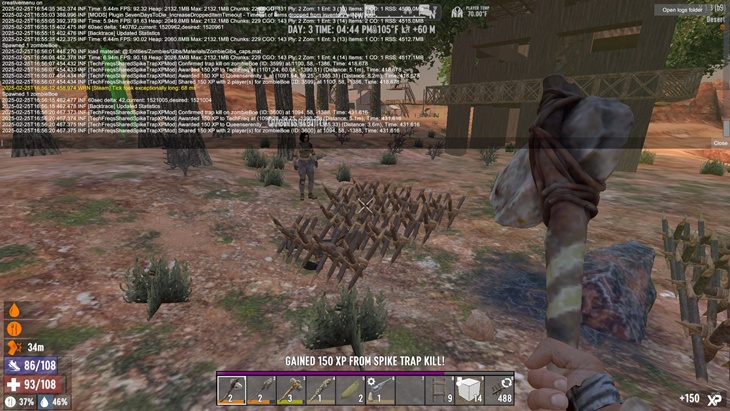
The TechFreq’s Shared Spike Trap XP Mod, for 7 Days to Die allows players to gain XP from enemy zombies and most hostile animals killed by wooden or iron spike traps. The XP distribution is proximity-based, meaning that if a player is near the traps when a kill occurs, they will receive XP—now rocking configurable , 150 XP per kill & 30m radius file.
Current Functionality:
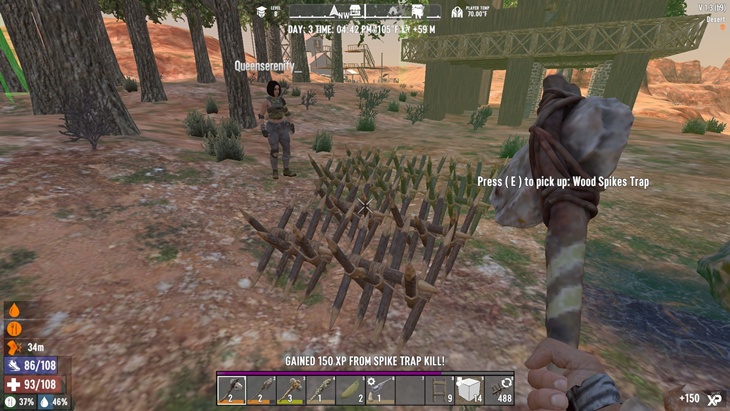
If a lone wolf’s near the spike traps, they bag 150 XP per kill—easy peasy! If a squad’s hanging out, everyone within the 20m radius scores their share—fair and square, no favoritism here! Too far? No XP for you—keeps it local and legit. Zombie dogs, bears, and other nasties? They drop XP too—tested and silky smooth! Logs confirm we all get XP when we’re close, and we *actually* see it—tooltip included for that sweet victory vibe!
Current Status:
– Basic XP system shines at 150 XP per kill
– Multiplayer XP sharing is perfect—all nearby players cash in the same amount within distance
– Enemy animals like zombie dogs and bears grant XP, no glitches
– Flawlessly shares XP within 20m—clean, reliable, and spam-free
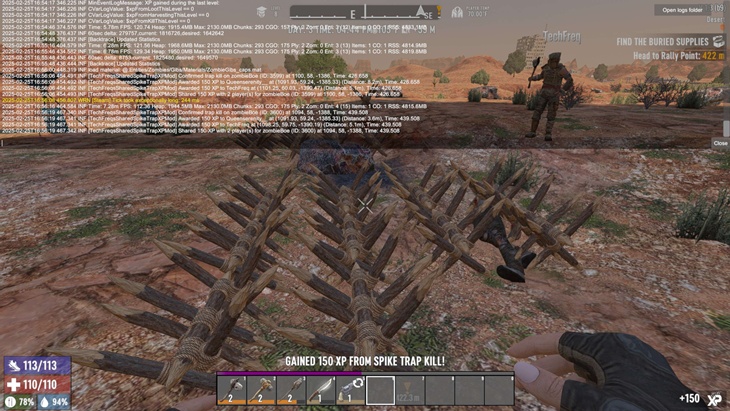
– Tooltip pops up for local players—“Gained 150 XP from spike trap kill!”
If a single player is near the spike traps, they receive XP (100 XP per kill).
If multiple players are nearby, the mod attempts to determine who to send the XP to,but if not in distance of the spike traps no xp will be givens
If a player is far away, it will show in logs upon entity kill and determine whether or not they should recieve it
When two players are present, the logs indicate XP is awarded to both,
Improve logging and feedback so each player gets clear confirmation of earned XP in LOGs via F1
Fixed XP inconsistencies
anything else that needs adjustments…
Installation:
Make sure harmony mod exist in the mod directory as it’s required.
Download the mod files, Extract Mod files.
Please backup your world, save, and or game files.
Place them in your Mods directory of your 7 Days to Die Game.
EAC must be disabled, although i hope in the future that can be changed, as for now DLLS are not EAC supported however XML has no issue, unfortunately this is a dll modification.
THIS IS CLIENT SIDE ONLY but maybe perhaps this is also, server side and client side compatibility?
No further setup needed. Enjoy!
TESTED CONFIRMED:
Works if client and server mod is installed simultaneously
Disclaimer:
By using this mod, you acknowledge that TechFreq is not responsible for any issues, crashes, or conflicts caused by its use.
Use at your own risk. Please backup your game files before installing any type of mod.
Thanks for downloading and enjoy!
CREDITS:
Thanks to TechFreq & A.I, ChatGPT or Microsoft CoPilot A.I or Grok AI from Twitter or X, for helping me create the modlet, aswell as with very little modding knowledge for the game and learning as i go i couldn’t do this without it and overall brainstorming and or the modding community.
I’d very much appreciate it and or any feedback for the mod(s) aswell
Support Notice: The best way to support TechFreq other than downloading mods, sharing the mod with friends, leaving feedback and endorsing the mod in general is all that i ask for, but if you want to go the extra mile although not necessary you may use Donation Links through paypal or ko-fi pages which again helps me a bunch!
However, Donations aren’t expected, every little bit of support helps along the way & fuels more mods, music, and bug fixes in the future,so thanks again for reading and being awesome in general and checking out the mod post.
Social Media:
If you appreciate ‘TechFreqs’ work and want to show support, use this donation link, although not necessary. Kofi Page.
I appreciate it in general for just checking out the mod posts, sharing and enjoying any of the mods in itself. Thank you again! and Happy gaming!
Love this mod? Got feedback or ideas or need to troubleshoot?
Join the TechFreq Pretty Rad Squad Discord Server!
Chill with us on Discord for game chat, memes, and even more mod updates!
As for TechFreqs music, it’s royalty-free music to use in your projects or for casual listening!
Source music files are available feel free to ask away, available in the discord! or for more content! TechFreqs Socials: https://beacons.ai/techfreq
Checkout the behind-the-scenes vibes today! Thank you again for checking out the mod post.
License: CC BY-NC-SA 4.0
This mod is licensed under Creative Commons Attribution-NonCommercial-ShareAlike 4.0 International. You can use it for personal play in *7 Days to Die*. Modifications or sharing require crediting TechFreq, linking to the mod page, and using the same license for derivatives. Contact me at beacons.ai/techfreq for permission for any modifications or changes.
See LICENSE.txt or http://creativecommons.org/licenses/by-nc-sa/4.0/ for full terms.
Note: Monetized videos/blogs showcasing this mod are allowed along as with credit to TechFreq.
Images
Changelogs
V4.5 ( V2.1)
– Fixed issue where if player kills themselves on the spike trap their bag and armour is missing, now it properly dropst he container or backpack.
– Fixed logic to detect zomibes better
– Added debug log for less verbosity on entity deaths for better logic that was much needed!
Previous Updates
V4.4
– Updated for 2.1 b9 of 7 days to die and fixed null reference exception.
Previous Changelog:
V4.3
– Updated for 2.0
– Fixed message with tooltip null error
– Fixed xp not granting to player from previous version.
– Updated ReadMe! and updated modinfo for website value
– Updated logs for debug thank you and troubleshooting message in blue highlight
– Updated Folder label and modinfo for mod name values keeping things consistent
Download
Download Link:DOWNLOAD ✔ Verified Safe (12 KB)
This file was scanned for viruses and verified safe using Norton 360.
DOWNLOAD ✔ File Scanned (12 KB)
This submission was scanned for viruses and verified safe as of November 17, 2025 using Norton 360. This file is externally hosted and may be updated by the author from time to time.
I do this for fun in my free time. Donations, Downloads, Feedback are appreciated, and help towards making new mods or content in the community.
If you appreciate my hard work feel free to send me a hazelnut coffee! Alternate donate link if preferred (Paypal).
Credits: TechFreq


If you have any questions or have any problems/bugs, please use the support link (Discord, Forum Topic, GitHub Issues, etc.) in the post. If there is no support link in the post, please use the comments section.
I think this mod affects the loot drop on blood moon, I did 4 blood moons and each time there’s either no loot at all or just one bag, and when I tried playing without it and I got about 12 bags, would be amazing if you could fix it!
this mod just crashes my game im on current build as well anyone else having this?
This is awesome!!!