
Description
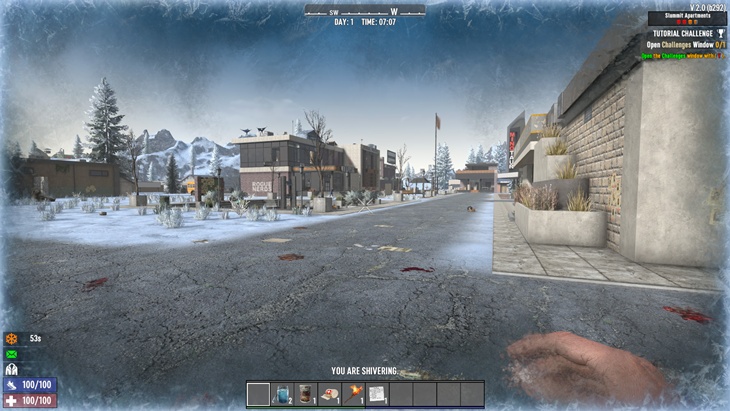
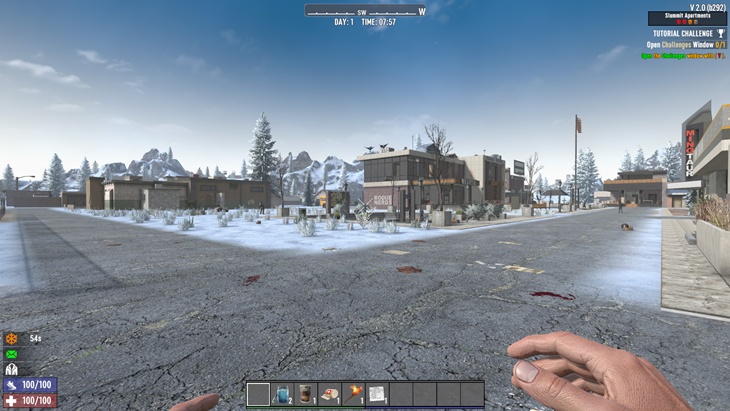
Removes the full-screen tint and haze visual effects that occur when entering hazardous biomes like Wasteland, Snow, and Desert. The biome hazard buffs still apply—but without the distracting or immersion-breaking screen overlays.Ideal for players who dislike post-processing screen clutter but want to keep the biome challenge intact.
Features
- Removes all
onSelfBuffStartscreen tint triggers from biome hazard buffs - No more red haze, blue blur, or yellow filters while exploring
- Core hazard mechanics (e.g., biome DOT effects) remain fully intact
- Improved visibility and visual clarity across all non-Pine Forest biomes
Compatibility
- Game Version: 2.0 (or later)
- Compatible with:
- Vanilla
- Most overhauls (unless they radically overhaul buff structure)
- Safe to add/remove mid-save (no custom assets or classes)
Notes / Warnings
- This does not remove the biome damage or hazard effects—only the screen tints.
- Compatible with other buff mods unless they override the exact same intensity values.
Installation Instructions
- Unzip the file into your 7 Days to Die Mods folder:
C:\Users\<YourUser>\AppData\Roaming\7DaysToDie\ModsSteam fallback path (deprecated but still supported):Steam\steamapps\common\7 Days To Die\Mods\ - Launch the game.
- Make sure the folder
ScreenEffectsBeGonesits directly inside theModsdirectory.
License
This modlet is released under the Demonata Gaming Mod Metadata License v1.0.
You may:
- Use this mod for personal gameplay
- Include it in mod packs with attribution
You may not:
- Re-upload or modify this mod without credit
- Claim this work as your own
For full details, see the included LICENSE.md file.
Images
Changelogs
v1.0.0 — Initial release:
Disabled intensity values on biome buff screen effects
Preserved all underlying hazard mechanics
Note: The “Source Code” downloads on the GitHub release page are for developers.
If you’re installing the mod, download the ZIP with the modlet name (e.g., ScreenEffectsBeGone.zip) instead.
Download
DOWNLOAD ✔ Verified Safe (6 KB)
This file was scanned for viruses and verified safe using Norton 360.
Credits: Kraevac






If you have any questions or have any problems/bugs, please use the support link (Discord, Forum Topic, GitHub Issues, etc.) in the post. If there is no support link in the post, please use the comments section.
does not work.
What is it that doesn’t work? This mod is working exactly as intended. What are you expecting the mod to do?
Could you do this mod the other way around? My friends and I would like to have these effects on the screen after getting the badge, to have this effect forever, but without taking the damage after getting the badge, if you can do it we would be extremely happy
I’m not sure. Let me look into it. There are triggers that turn the effect off, so I should be able to do this. Give me a day or so.
I’ll be waiting and hoping it works out.