
Description
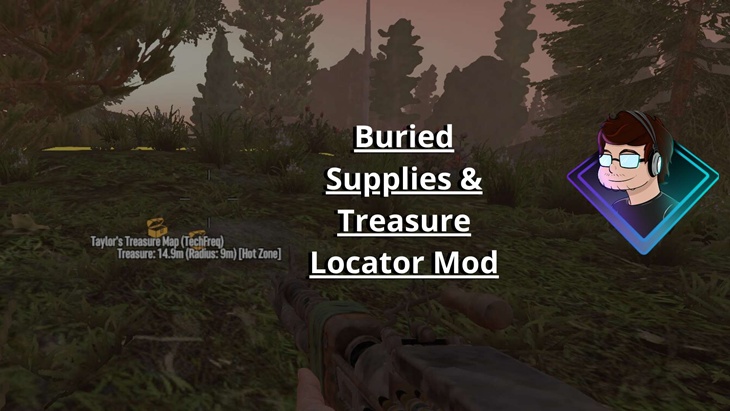
The TechFreqs Buried Supplies And Treasure Finder Locator Mod V1.7, Enhances the 7 Days to Die by displaying the location of buried stashes (both “Buried Supplies” from traders and treasure map caches) with on-screen distance, radius, and hot zone indicators, making them easier to find.
Toggle: Activated/deactivated with Numpad 2, showing tooltips: “TechFreqsBuriedSuppliesAndTreasureFinder Enabled Happy Looting!” or “Disabled” messages.
Overall Key Features:
Designed to enhance the treasure-hunting experience by providing real-time, on-screen guidance to buried stashes.
Whether you’re tackling a trader’s “Buried Supplies” quest or following a treasure map, this mod ensures you never lose track of your loot.
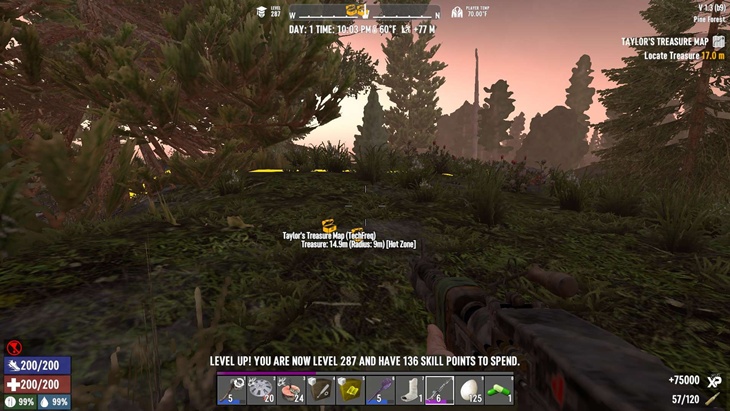
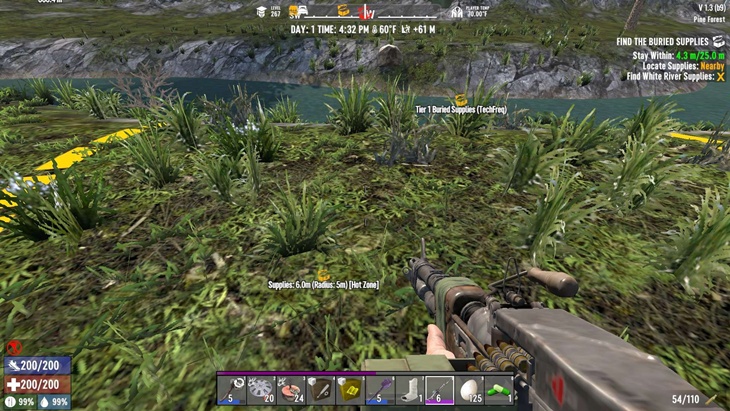
When activated with the Numpad 2 key also configurable, it displays the stash’s location with a treasure icon, distance in meters, current digging radius
(if applicable), and a “[Hot Zone]” indicator when within 30 meters.
The display persists through the digging phase (yellow circle) and automatically disappears once the stash is looted, keeping your HUD clean.
With minimal debug logging for key actions—activation, stash detection, visibility enforcement, and cleanup—this mod combines functionality with a tidy user experience. Configurable via JSON, it’s a must-have for efficient looting in the zombie apocalypse.
Display:
Buried Supplies: “Supplies: X.Xm (Radius: Ym) [Hot Zone]” with ui_game_symbol_treasure icon and compass marker.
Treasure Maps: “Treasure: X.Xm (Radius: Ym) [Hot Zone]” with icon and compass marker, visible during the yellow circle phase.
Hot Zone: Adds “[Hot Zone]” when within 30m of the stash.
Behavior:
Shows stash info from the start of the quest, persisting through digging (yellow circle), and disappears immediately after looting when the stash block (e.g., cntburiedlootstashchest) is gone or the objective is complete.
Technical Details:
Patches: Uses Harmony to patch EntityPlayerLocal.Update (main logic), NavObject.IsValidPlayer (forces visibility), and ObjectiveTreasureChest.Update (ensures on-screen display during yellow circle).
Block Check: Verifies stash existence by checking block names (e.g., contains “chest” and “stash”) to trigger cleanup post-looting.
Logging: Minimal debug logs for key actions (enable, stash detection, visibility, cleanup, disable), displayed once per event.
Default: “Keypad2” (the “2” key on your numpad), as specified in the current config.json and hardcoded as a fallback in the code.
Customizable: You can change it to any valid Unity KeyCode value (e.g., “F1”, “Numpad1”, “Space”, “Alpha2” for the main keyboard “2”, etc.).
KNOWN BUGS:
Their is a bug where , when you have the mod enabled and their isn’t a treasure or buried supplies, the mod will try to detect a weapon stash or buried supplies that doesn’t exist in the distance, not too sure as to why? but it hasn’t really bothered me too much as i disable the mod after im done looting anyways lol
And the compass marker may disappear, when it is locating the buried supplies just on the compass, but On screen it will display the distance and white treasure icon dynamically. so its a win win.
Disclaimer:
By using this mod, you acknowledge that TechFreq is not responsible for any issues, crashes, or conflicts caused by its use.
Use at your own risk. Please backup your game files before installing any type of mod.
Thanks for downloading and enjoy!
Installation:
Make sure harmony mod exist in the mod directory as it’s required.
Download the mod files, Extract Mod files.
Please backup your world, save, and or game files.
Place them in your Mods directory of your 7 Days to Die Game.
EAC must be disabled, although i hope in the future that can be changed, as for now DLLS are not EAC supported however XML has no issue, unfortunately this is a dll modification.
THIS IS CLIENT SIDE ONLY but maybe perhaps this is also, server side and client side compatibility?
No further setup needed. Enjoy!
CREDITS:
Thanks to TechFreq & A.I, ChatGPT or Microsoft CoPilot A.I or Grok AI from Twitter or X, for helping me create the modlet, aswell as with very little modding knowledge for the game and learning as i go i couldn’t do this without it and overall brainstorming and or the modding community.
I’d very much appreciate it and or any feedback for the mod(s) aswell
Support Notice: The best way to support TechFreq other than downloading mods, sharing the mod with friends, leaving feedback and endorsing the mod in general is all that i ask for, but if you want to go the extra mile although not necessary you may use Donation Links through paypal or ko-fi pages which again helps me a bunch!
However, Donations aren’t expected, every little bit of support helps along the way & fuels more mods, music, and bug fixes in the future,so thanks again for reading and being awesome in general and checking out the mod post.
Social Media:
If you appreciate ‘TechFreqs’ work and want to show support, use this donation link, although not necessary. Kofi Page.
I appreciate it in general for just checking out the mod posts, sharing and enjoying any of the mods in itself. Thank you again! and Happy gaming!
Love this mod? Got feedback or ideas or need to troubleshoot?
Join the TechFreq Pretty Rad Squad Discord Server!
Chill with us on Discord for game chat, memes, and even more mod updates!
As for TechFreqs music, it’s royalty-free music to use in your projects or for casual listening!
Source music files are available feel free to ask away, available in the discord! or for more content! TechFreqs Socials: https://beacons.ai/techfreq
Checkout the behind-the-scenes vibes today! Thank you again for checking out the mod post.
License: CC BY-NC-SA 4.0
This mod is licensed under Creative Commons Attribution-NonCommercial-ShareAlike 4.0 International. You can use it for personal play in *7 Days to Die*. Modifications or sharing require crediting TechFreq, linking to the mod page, and using the same license for derivatives. Contact me at beacons.ai/techfreq for permission for any modifications or changes.
See LICENSE.txt or http://creativecommons.org/licenses/by-nc-sa/4.0/ for full terms.
Note: Monetized videos/blogs showcasing this mod are allowed along as with credit to TechFreq.
Images
Changelogs
V1.7
– Updated for 2.0
– Updated debuglog for troubleshooting log in blue highlight
– Fixed tooltip msg
– Uses treasure icon in white to detect buried supplies or treasure stashes, works for weapon stashes now too!
Previous Updates
Same as for Game Version V1.4 on mod version V1.6
KNOWN BUGS:
Not as much CONSOLE SPAM BUG!
So upon of location, nav object, until its triggered off, so its a bit noisy for debugging but functional?
(i.e [TechFreqsTreasureFinder] NavObject forced valid for player
[TechFreqsTreasureFinder] NavObject unregistered on disable
[TechFreqsTreasureFinder] NavObject forced valid for player
[TechFreqsTreasureFinder] Forcing visibility for treasure chest at (314.00, 57.00, 816.00), Radius: 0
[TechFreqsTreasureFinder] NavObject forced valid for player
[FinishTreasureQuest] Requesting reset at world position: 368, 57, -798
Dissapearance Issue:
As for treasure quests , it’ll show the compass and distance immediate and disappear once its looted within radius normal right but, THE buried supplies missions doesn’t, up until youstart the mission and then it shows distance and radius of said stash hhowever it doesn’t disappear after its been looted.
At least its a good thing theirs a toggle button right?? as its still functional 🙂
AS for the OTHER BUG is that, i had forgotten to add the weapons chest or supplies stash whers thats when you’d find armour mods or weapon mods in a a buried supplies stash, and so as of now that isnt located in the game at all,
HOPEFULLY , the logs and that one chest issues , can be located without issue in the future, but wanted to make that known.
Download
Download Link:DOWNLOAD ✔ Verified Safe (10 KB)
This file was scanned for viruses and verified safe using Norton 360.
DOWNLOAD ✔ File Scanned (10 KB)
This submission was scanned for viruses and verified safe as of November 17, 2025 using Norton 360. This file is externally hosted and may be updated by the author from time to time.
I do this for fun in my free time. Donations, Downloads, Feedback are appreciated, and help towards making new mods or content in the community.
If you appreciate my hard work feel free to send me a hazelnut coffee! Alternate donate link if preferred (Paypal).
Credits: TechFreq


If you have any questions or have any problems/bugs, please use the support link (Discord, Forum Topic, GitHub Issues, etc.) in the post. If there is no support link in the post, please use the comments section.