
Description
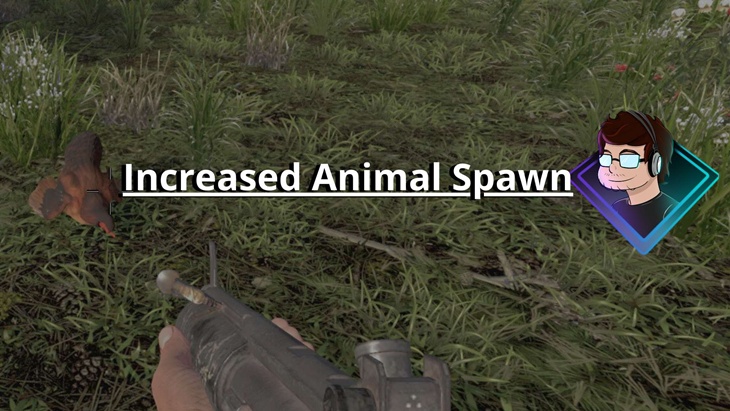
The TechFreqs Increased Animal Spawn Mod, for 7 Days to Die increases the spawn counts of animals and enemy animals in all biomes, adding night spawns where applicable. It’s designed to revert to the game’s default settings when removed.
Key Features:
– **Default Spawn Count**: 3 or 2 per spawn type (configurable).
– **Biomes Covered**: Pine Forest, Burnt Forest, Desert, Snow, Wasteland.
– **Reversible**: Uses `<append>` to avoid modifying vanilla files.
– **Configurable json & DLL for dynamic spawn logic! although game settings are set to 5, but if set to 10 then 10 alive entitys can be alive at once or less if you’d like.
Any variable changes, you must change entitygroups max count if you prefer a separate amount of animals during the day or night.
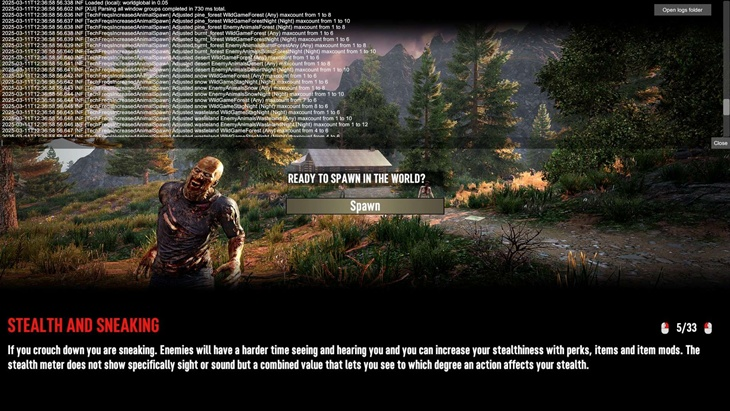
– **Debug Logs for more information based on preloading a save and what was slightly changed pressing F1 for more details.
Disclaimer:
By using this mod, you acknowledge that TechFreq is not responsible for any issues, crashes, or conflicts caused by its use.
Use at your own risk. Please backup your game files before installing any type of mod.
Thanks for downloading and enjoy!
Installation:
Download the mod files, Extract Mod files.
Place them in your Mods directory of your 7 Days to Die Game ,
Make sure harmony mod exist in the mod directory.
EAC must be disabled, although i hope in the future it can be compatible
THIS IS CLIENT SIDE ONLY , only XML edits
Enjoy!
### How to Configure Manually
1. Open ‘spawning’ xml in a text editor , i.e notepad++
2. Adjust the numbers for each biome and spawn type:
– `WildGameDay`: Daytime friendly animals.
– `WildGameNight`: Nighttime friendly animals (if applicable).
– `EnemyAnimalsDay`: Daytime hostile animals.
– `EnemyAnimalsNight`: Nighttime hostile animals.
3. Open `entitygroups` and manually update the `maxcount` values to match your settings. Look for comments like `<!– Config: PineForest.WildGameDay –>` to find the right lines.
4. Save and reload the game.
### Example
To increase Pine Forest daytime wild animals to 5:
– change `”WildGameDay”: 3` to `”WildGameDay”: 5` under `”PineForest”`.
– change `<spawn id=”tf_wg01″ maxcount=”3″ … />` to `<spawn id=”tf_wg01″ maxcount=”5″ … />`.
## Removal
Delete the `TechFreqsMoreAnimals` folder from `Mods/`. The game will revert to vanilla spawn settings.
FILE DIFFERENCES:
TechFreqsIncreasedAnimalSpawnV2
This mod increases the spawn counts of animals and enemy animals in all biomes, adding night spawns where applicable. (5+5+5+5) 4 to 10 configuration very low
TechFreqsIncreasedAnimalSpawnV2 – Balanced Amount
Balanced Amount,Total maxcount per biome now ranges from 16-24 (e.g., Pine Forest: 8 + 10 + 6 + 8 = 32 potential if overlapping), vs. the original V2 of 20 (5 + 5 + 5 + 5). Making it more balanced than V2 Aiming for 30-50 total animals per biome vs 16-24
TechFreqsIncreasedAnimalSpawnV2 – Much More Animal
Much More Animals, Total Spawns: 45-53 animals per biome, now with higher spawn rates from 5 to 10 to 15 up to 20. Example Pine Forest: 49 (12 + 15 + 10 + 12) → Rabbits everywhere, Stags/Does at night, frequent wolves/bears.
TechFreqsIncreasedAnimalSpawnV2-Way Too ManyAnimal
Total Spawns: 90-115 animals per biome (vs. 45-53 previously):
Pine Forest: 100 (25 + 30 + 20 + 25) → Rabbits, deer, wolves everywhere.
Burnt Forest: 95 (20 + 20 + 25 + 30) → Vulture/boar hordes, some deer.
Desert: 95 (20 + 20 + 25 + 30) → Coyote/vulture chaos, rabbits hiding.
Snow: 110 (25 + 30 + 25 + 30) → Deer herds, bear armies.
Wasteland: 95 (15 + 15 + 30 + 35) → Sparse deer, enemy flood.
CREDITS:
Thanks to TechFreq & A.I, ChatGPT or Microsoft CoPilot A.I or Grok AI from Twitter or X, for helping me create the modlet, aswell as with very little modding knowledge for the game and learning as i go i couldn’t do this without it and overall brainstorming and or the modding community.
I’d very much appreciate it and or any feedback for the mod(s) aswell
Support Notice: The best way to support TechFreq other than downloading mods, sharing the mod with friends, leaving feedback and endorsing the mod in general is all that i ask for, but if you want to go the extra mile although not necessary you may use Donation Links through paypal or ko-fi pages which again helps me a bunch!
However, Donations aren’t expected, every little bit of support helps along the way & fuels more mods, music, and bug fixes in the future,so thanks again for reading and being awesome in general and checking out the mod post.
Social Media:
If you appreciate ‘TechFreqs’ work and want to show support, use this donation link, although not necessary. Kofi Page.
I appreciate it in general for just checking out the mod posts, sharing and enjoying any of the mods in itself. Thank you again! and Happy gaming!
Love this mod? Got feedback or ideas or need to troubleshoot?
Join the TechFreq Pretty Rad Squad Discord Server!
Chill with us on Discord for game chat, memes, and even more mod updates!
As for TechFreqs music, it’s royalty-free music to use in your projects or for casual listening!
Source music files are available feel free to ask away, available in the discord! or for more content! TechFreqs Socials: https://beacons.ai/techfreq
Checkout the behind-the-scenes vibes today! Thank you again for checking out the mod post.
License: CC BY-NC-SA 4.0
This mod is licensed under Creative Commons Attribution-NonCommercial-ShareAlike 4.0 International. You can use it for personal play in *7 Days to Die*. Modifications or sharing require crediting TechFreq, linking to the mod page, and using the same license for derivatives. Contact me at beacons.ai/techfreq for permission for any modifications or changes.
See LICENSE.txt or http://creativecommons.org/licenses/by-nc-sa/4.0/ for full terms.
Note: Monetized videos/blogs showcasing this mod are allowed along as with credit to TechFreq.
Images
Changelogs
V2.1
– Updated for 2.0 of 7days to die
– Added debug log troubleshoot support message in logs
– Updated readme, and same file differences count from previous release
Download
Download Links:DOWNLOAD ✔ Verified Safe (11 KB)
DOWNLOAD ✔ Verified Safe Balanced Amount (11 KB)
DOWNLOAD ✔ Verified Safe Much More Animals (11 KB)
DOWNLOAD ✔ Verified Safe Way Too Many Animals (11 KB)
This file was scanned for viruses and verified safe using Norton 360.
DOWNLOAD ✔ File Scanned (11 KB)
DOWNLOAD ✔ File Scanned Balanced (11 KB)
DOWNLOAD ✔ File Scanned Much More Animals (11 KB)
DOWNLOAD ✔ File Scanned Way Too Many Animals (11 KB)
This submission was scanned for viruses and verified safe as of November 17, 2025 using Norton 360. This file is externally hosted and may be updated by the author from time to time.
I do this for fun in my free time. Donations, Downloads, Feedback are appreciated, and help towards making new mods or content in the community.
If you appreciate my hard work feel free to send me a hazelnut coffee! Alternate donate link if preferred (Paypal).
Credits: TechFreq









If you have any questions or have any problems/bugs, please use the support link (Discord, Forum Topic, GitHub Issues, etc.) in the post. If there is no support link in the post, please use the comments section.
increased zombie Spawn?
https://7daystodiemods.com/more-zombie-spawns/
Wow, this is incredible. I really like it and it works for me. Do you have any that increase the number of zombies that appear? Or something similar?
There are already plenty of mods that have been made before.
https://7daystodiemods.com/increased-zombie-spawning/
https://7daystodiemods.com/improved-hordes/
https://7daystodiemods.com/wandering-horde-frequency/
https://7daystodiemods.com/increased-wandering-horde-size/
Oh, I’ve already installed those, but none of them worked for me since they are outdated versions :C
I’m sure this works: https://7daystodiemods.com/more-zombie-spawns/